
TL;DR
Video Business Cards take the basic idea of a business card and turn it into a small multimedia presentation.
Instead of relying only on a name, phone number, and website, an LCD Video Business Card can play a personal introduction, product demonstration, customer story, sales pitch, or company message directly from the card itself.
For salespeople, real estate agents, consultants, executives, and other professionals, the biggest advantage is simple.
The person receiving the card gets to hear and see your message again after the conversation is over.
Direct Answer
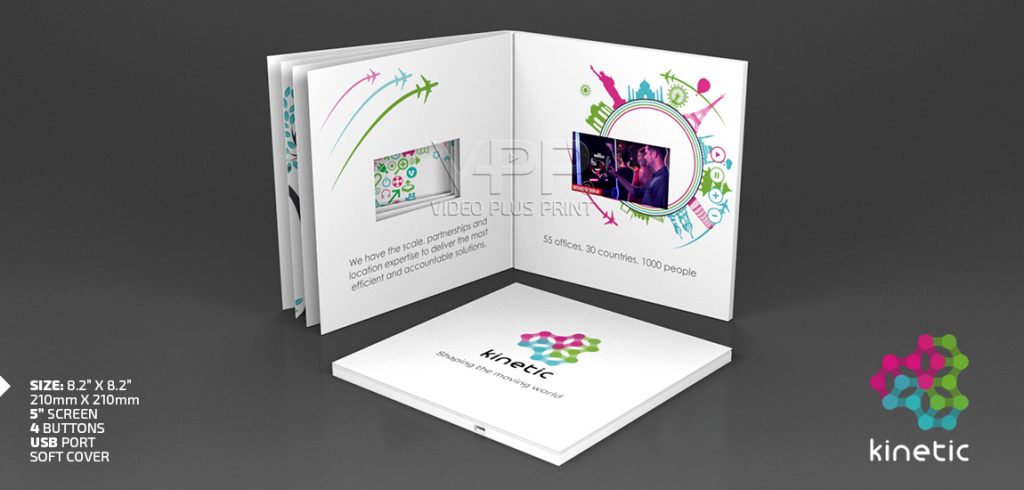
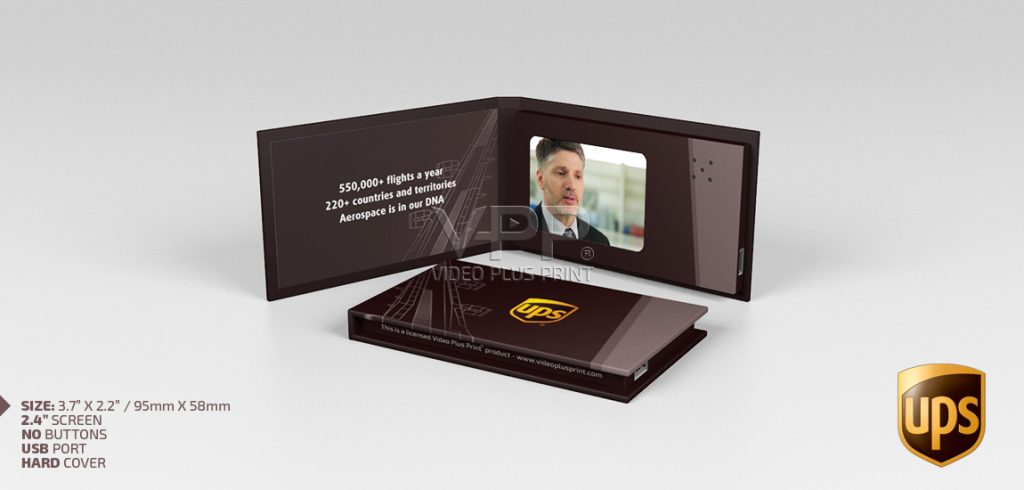
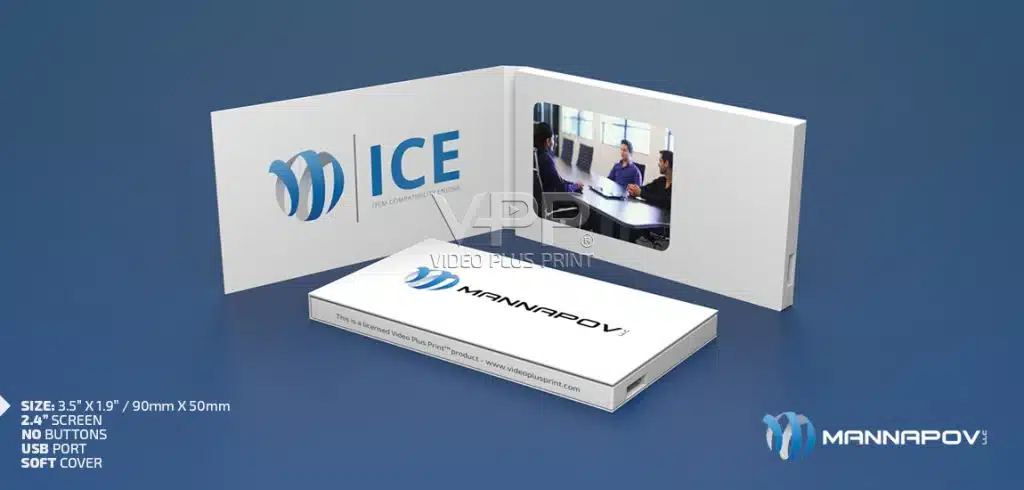
A Video Business Card is a compact printed marketing tool with a built-in LCD screen, speaker, rechargeable battery, and internal video memory.
The recipient can press a button or open the card, depending on the configuration, and watch video directly from the physical piece.
Unlike a QR-code business card, the recipient does not have to pull out a phone, open a camera, scan a code, wait for a website, or search for the sender later.
Video Plus Print manufactures custom LCD Video Business Cards that can include your company branding, personal contact information, custom button icons, and one or more videos.
The stored content can also be updated later using the supplied USB-C to USB cable.
For businesses ordering compact 2.4″ Video Cards, pricing can start in the approximate $15 to $20 USD per-unit range depending on quantity and final specifications.

A Business Card Usually Ends the Conversation
Most business cards are exchanged at the end of a meeting.
Then they disappear.
They go into a pocket.
A wallet.
A desk drawer.
A conference bag.
Sometimes the recipient looks at the card again.
Often they do not.
That creates an interesting problem.
The person may remember meeting you but forget exactly what you do.
A Video Business Card gives the card another job.
It can repeat the conversation.
The recipient can hear your voice.
See your product.
Watch your company.
Review the presentation.
And understand why you wanted to connect in the first place.
What Is a Video Business Card?
Think of it as a small physical introduction that can speak for you when you are no longer in the room.
The printed portion can still contain:
Your name
Company
Job title
Phone number
Email
Website
Logo
Call to action
The difference is the LCD screen.
That screen lets you add a layer traditional print cannot provide.
Movement.
Sound.
Personality.
Demonstration.
For a salesperson, that might mean a 45-second introduction.
For a real estate agent, it could be a property reel.
For a consultant, it could explain a complicated service.
For a founder, it might tell the company story.
The format changes depending on the person using it.
The Best Video Business Card Is Not Really About the Card
It is about what happens after someone receives it.
Imagine meeting an important prospect at an event.
You have five minutes together.
The room is busy.
Other conversations are happening.
The prospect leaves with information from ten other companies.
Later that evening, they pick up your card.
They press play.
Now you have their attention again.
That second interaction can be more valuable than making the physical card unnecessarily complicated.
The card should make the message easier to remember.
How Does a Video Business Card Work?
The video files are stored in internal memory.
The screen, speaker, battery, and controls are built into the printed card.
The recipient does not stream the video.
They play it directly from the device.
Depending on the design, buttons can control:
Play / Pause
Volume
Previous video
Next video
Individual video chapters
The electronics are rechargeable.
The stored files can also be changed later.
That makes the card closer to a reusable sales tool than a traditional disposable business card.
LCD Video Business Card vs Traditional Business Card
Traditional business cards still have a purpose.
They are inexpensive.
Easy to carry.
Easy to hand out.
And completely appropriate for everyday networking.
A Video Business Card serves a different purpose.
It makes more sense when the person receiving the card is valuable enough that you want to leave behind something more substantial.
Traditional card:
Contact information
Video Business Card:
Contact information + story + demonstration + personality
That is the real difference.
One identifies you.
The other can continue presenting you.
What About a QR-Code Business Card?
QR codes are useful.
They can lead someone to:
A website
LinkedIn profile
Video
Booking page
Portfolio
Product page
But they create another step.
The recipient needs to decide to scan.
Then they need a phone.
Then a connection.
Then they need to stay engaged after leaving the physical card.
An LCD Video Business Card removes several of those steps because the video is already inside the presentation.
That does not mean you need to choose one or the other.
A strong Video Business Card can still include a QR code.
The screen creates interest.
The QR code creates the next action.
What Should You Put on the Video?
This is where many projects either become useful or become forgettable.
Do not simply transfer your website homepage onto video.
Give the video one clear job.
For a salesperson:
“Here is why I wanted to meet you.”
For a consultant:
“Here is the problem I help companies solve.”
For a real estate agent:
“Here is how I market properties differently.”
For an executive:
“Here is our company in 60 seconds.”
For a manufacturer:
“Here is our product working.”
The video should help the recipient remember why the conversation mattered.
Can You Record a Personal Sales Pitch?
Yes.
And this is one of the strongest uses.
A sales representative can record a short personal message explaining:
Who they help
What problem they solve
Why their company is different
What the prospect should do next
That message can be much more natural than trying to squeeze every selling point into printed copy.
It also allows the salesperson’s personality to remain part of the presentation.
That is important.
People often remember the person before they remember the product.
Best Video Business Card for Sales Reps
The best configuration is usually not the one with the most features.
It is the one the salesperson will actually use.
A useful sales card should be:
Small enough to carry
Easy to operate
Fast to understand
Professionally branded
Focused on one clear message
Easy to update
Rechargeable
Relevant to the sales conversation
A short, strong presentation often works better than loading the card with ten different videos.
The card should support the sales rep.
Not replace them.
Video Business Cards for Real Estate Agents
Real estate is naturally visual.
That makes it a good fit for this format.
An agent could use the screen to show:
Property highlights
Drone footage
Luxury listings
Neighborhood footage
Client testimonials
Agent introduction
Recent sales
Instead of handing someone a card that simply says “Realtor,” the agent can show what working with them looks like.
That can be especially useful for:
Luxury real estate
New developments
Commercial properties
Investor relationships
Listing presentations
The card becomes a small portfolio.
Consultants Can Explain What They Actually Do
Consulting is often difficult to explain in ten seconds.
Especially when the service is specialized.
A consultant can use a Video Business Card to answer questions like:
What problem do I solve?
Who do I work with?
What does the process look like?
What results do clients want?
That is much more useful than filling both sides of a card with tiny text.
The screen gives the message room to breathe.
One Video or Multiple Chapters?
One video is often enough.
But some professionals need more.
For example, a business development card might contain:
Meet Me
What We Do
See Our Work
Customer Story
Contact Us
Dedicated buttons can take the recipient directly to each section.
This works particularly well when the card is being used as a small presentation rather than simply as a networking item.
How Long Should a Video Be?
Short enough that the recipient wants to finish it.
There is no universal length.
A personal introduction might need 30 to 60 seconds.
A demonstration may need longer.
A portfolio may work better as several short chapters.
The key question is:
How much does the recipient really need to know at this stage?
A Video Business Card is usually the beginning of the relationship.
It does not need to explain everything.
Can the Video Be Updated?
Yes.
This is one of the reasons these products can have more value than one-time printed pieces.
Video Plus Print products can have their stored content updated using the supplied USB-C to USB cable.
That allows a professional to refresh the presentation when:
A new product launches
Their job changes
A new listing becomes available
An event ends
A campaign changes
New customer stories become available
The physical card can remain useful even when the message evolves.
How Do You Upload New Content?
The card connects to a compatible computer using the supplied USB-C to USB cable.
The stored video files can then be replaced with properly prepared files.
For Video Plus Print products, MP4 using H.264 encoding is generally the preferred format. The resolution of the 2.4″ LCD screen is 320*240.
The video should also be prepared for the resolution of the screen being used.
The goal is reliable playback.
Not the largest possible video file.
Battery Life Is About How the Card Is Actually Used
A Video Business Card is not intended to play video continuously all day.
Most people will watch for a few minutes.
Then the card goes back onto a desk or into a bag.
Battery performance depends on:
Screen size
Brightness
Video duration
Speaker volume
Battery capacity
How often it is used
The battery is rechargeable, so the card can be charged again between meetings or events
Are Video Business Cards Reusable?
Yes.
They can be recharged.
The stored video can be updated.
That makes them particularly useful for professionals who want to keep several cards for:
Meetings
Presentations
Trade shows
Networking
Client visits
Sales calls
You do not necessarily need to hand one to every person you meet.
Some businesses use them more like premium leave-behind presentations.
Who Should Actually Receive One?
This matters more than people think.
A Video Business Card is not a replacement for handing out 500 inexpensive paper cards.
Use it selectively.
Think:
Major prospect.
Potential referral partner.
Important customer.
Investor.
VIP contact.
Luxury client.
Key trade show lead.
The more valuable the relationship, the easier it becomes to justify a more substantial leave-behind.
How Much Does a Video Business Card Cost?
Pricing depends on the screen size, quantity, memory, printing, buttons, configuration, and delivery requirements.
For compact 2.4″ Video Cards, Video Plus Print pricing can start around $15 to $20 USD per unit, depending on the final project specifications and volume.
Larger screens or more customized configurations can cost more.
The important thing is to compare the card against the value of the person receiving it.
If the recipient represents a high-value opportunity, the economics look very different from mass-distributing inexpensive paper cards
Why Quantity Matters
Like most custom manufactured products, larger production runs generally reduce the cost per unit.
But quantity should follow strategy.
If your sales team has 40 strategic accounts, producing thousands simply to lower the unit cost may not make sense.
A smaller targeted campaign can be more useful.
Video Plus Print has no minimum order quantity, so businesses can build production around the actual campaign rather than an arbitrary minimum.
Can Video Business Cards Be Fully Branded?
Yes.
The printed areas can be designed around:
Corporate colors
Logo
Contact information
Photography
Product images
Personal branding
Calls to action
QR codes
Button labels
The electronics should feel like part of the design.
Not something added afterward.
A strong card looks like one complete product.
Networking Events Are About What Happens After the Event
At a conference, everyone is exchanging information.
That means the real competition often begins once people get home.
Who gets remembered?
Who gets contacted?
Who gets searched?
Who gets ignored?
A Video Business Card can give the recipient a reason to revisit your conversation.
That is where its value becomes more interesting.
Not during the handshake.
After it.
Do Video Business Cards Increase Response Rates?
No physical marketing tool can guarantee a response.
The quality of the audience, offer, conversation, video, and follow-up still matter.
What the format can do is create another opportunity for engagement.
Instead of relying on memory alone, the recipient has a physical presentation that can repeat the message.
That can be useful for salespeople working with longer sales cycles or complex offerings.
What Is the Difference Between a Video Business Card and a Video Brochure?
The largest difference is usually scale and purpose.
A Video Business Card is generally more compact and focused on:
Personal introduction
Networking
Sales outreach
Contact information
Short presentations
A Video Brochure provides more physical space for:
Detailed printed information
Larger screens
Longer presentations
Multiple sections
Product information
Think of the business card as the introduction.
Think of the brochure as the presentation.
When Should You Use Something Larger?
A Video Business Card is not the best choice for every campaign.
If you need to include:
Detailed specifications
Large photography
Multiple printed pages
Product samples
Gifts
Long presentations
another format may make more sense.
That might include:
Choose the format around what you need the recipient to experience.
A Better Way to Think About Business Cards
The traditional question is:
“What information should be printed on my card?”
With video, a better question becomes:
“What should this person remember about me after I leave?”
That changes the creative process.
Maybe it is your personality.
Your product.
Your work.
Your results.
Your company story.
Your point of difference.
The physical card is only the delivery method.
The message is what makes it useful.
Why Video Plus Print?
Video Plus Print has manufactured video-in-print products since 2009.
Video Business Cards can be customized around the screen, printed design, memory, controls, video content, and intended use.
Video Plus Print can preload approved video files before delivery.
The content can later be updated using the supplied USB-C to USB cable.
Products use rechargeable batteries and can be configured with custom printed controls.
Video Plus Print also manufactures:
Video Brochures
Video Mailers
Video Boxes
Video Folders
Video Packaging
Video Books
Video Cards
The goal is to choose the format that best supports the message rather than forcing every campaign into the same product.

Key Takeaways
Video Business Cards combine printed contact information with a built-in LCD video presentation.
They are best used selectively for valuable prospects, customers, and professional relationships.
The video can introduce the person, demonstrate products, show work, or explain services.
They can be useful for sales representatives, real estate agents, consultants, executives, freelancers, and other professionals.
An LCD Video Business Card does not require the recipient to scan a QR code before watching the stored video.
QR codes can still be added to create a next step after the video.
Multiple video chapters can be included when the presentation needs more than one message.
Video content can be updated later using the supplied USB-C to USB cable.
The battery is rechargeable.
MP4 using H.264 encoding is generally preferred for video playback.
Compact 2.4″ Video Cards can start around $15 to $20 USD per unit depending on quantity and final specifications.
Higher quantities generally reduce per-unit pricing.
Video Plus Print has no minimum order quantity.
The strongest cards focus on one clear reason for the recipient to remember the person or company.
Frequently Asked Questions About Presentation Boxes
Q: What is a video business card?
A: A Video Business Card is a compact printed marketing tool containing an LCD screen, speaker, rechargeable battery, internal memory, and video playback controls. It combines contact information with a multimedia presentation.
Q: How does an LCD video business card work?
A: Video files are stored inside the card’s internal memory. The recipient uses the built-in controls to play the video directly on the LCD screen without needing to stream the content from another device.
Q: How much does a custom video business card cost?
A: Pricing depends on screen size, quantity, memory, printing, button configuration, and delivery. Compact 2.4″ Video Cards can start at approximately $15 to $20 USD per unit depending on the final project specifications and order volume.
Q: Can I record a personal pitch on a video business card?
A: Yes. A salesperson, consultant, executive, real estate agent, or other professional can use a personal introduction as the main video. This can help the recipient reconnect the physical card with the person they met.
Q: What’s the battery life of a video business card?
A: Battery performance varies based on screen size, brightness, volume, video length, battery capacity, and usage. The battery is rechargeable, which allows the card to be used repeatedly.
Q: Are video business cards reusable?
A: Yes. They can be recharged and the stored videos can be updated, making them useful for repeated meetings, sales calls, events, and presentations.
Q: What industries use video business cards most?
A: They can work well in real estate, technology, financial services, consulting, automotive, healthcare, manufacturing, professional services, luxury sales, creative industries, and other fields where personal presentation matters.
Q: How do video business cards compare to QR-code cards?
A: A QR-code card requires the recipient to scan the code with another device before viewing digital content. A Video Business Card plays stored video directly on its own LCD screen. A Video Business Card can also include a QR code for additional follow-up.
Q: Can I bulk-order branded video business cards?
A: Yes. Video Business Cards can be manufactured in larger quantities with custom branding, printed contact information, button graphics, and preloaded video content. Larger quantities typically provide better per-unit pricing.
Q: Are video business cards effective for networking events?
A: They can be particularly useful when used selectively with important contacts. The recipient can replay the introduction after the event, helping reinforce the conversation when many other people may have exchanged ordinary business cards.
Q: What screen sizes are available for video business cards?
A: Screen selection depends on the finished card dimensions and intended use. Compact LCD options such as 2.4″ are particularly suited to business-card-style presentations, while larger formats may move closer to a Video Brochure.
Q: How long can a video run on a video business card?
A: Video length depends primarily on the available memory and file size. Short introductions are usually more practical for networking, while additional memory can support longer presentations or multiple videos.
Q: Can I update the video on a video business card after it’s been given out?
A: Yes. Video Plus Print products can have their stored content changed using the supplied USB-C to USB cable and a compatible computer.
Q: How do I upload a video to a video business card?
A: Connect the card to a compatible computer using the supplied USB-C to USB cable, access the internal storage, and replace the appropriate video files with properly prepared content.
Q: Are video business cards durable enough for daily carry?
A: They contain electronics, so they should be treated more carefully than disposable paper cards. They are better suited to planned meetings, presentations, networking events, and targeted sales outreach than being carried loosely with ordinary cards.
Q: Can video business cards include multiple videos or chapters?
A: Yes. Multiple videos can be loaded and assigned to individual buttons, allowing the recipient to move between introductions, demonstrations, customer stories, portfolio work, or calls to action.
Q: What’s the difference between a video business card and a video brochure?
A: A Video Business Card is generally compact and focused on introductions, networking, and short sales messages. A Video Brochure provides more physical print space and is better suited to longer or more detailed presentations.
Q: Do video business cards increase response rates for sales outreach?
A: No marketing product guarantees a higher response rate. Their advantage is giving prospects another opportunity to watch, hear, and remember the sales message after the initial interaction, which can support targeted follow-up.
Q: Can video business cards be branded with a company logo and colors?
A: Yes. The printed areas can include company colors, logos, photography, personal contact details, calls to action, QR codes, button labels, and other custom artwork.
Q: Are video business cards a good investment for freelancers and consultants?
A: They can be when individual clients or projects have meaningful value. A freelancer or consultant can use the card as a compact portfolio, introduction, service explanation, or personal sales presentation instead of relying only on printed contact information.